PAN Card Cropper Tool: e-PAN PDF Ko Perfect Print Size Mein 1-Click Mein Crop Karein - Complete Guide
Aaj ke digital aur fast-paced samay mein, chahe aapko kisi bhi bank mein ek naya savings account open karwana ho, apna Income Tax Return (ITR) file karna ho, stock market mein trading karne ke liye Demat account kholna ho, ya phir mutual funds mein invest karna ho, Permanent Account Number yaani PAN Card ek sabse zaroori aur mahatvapurna financial identity proof ban chuka hai. Income Tax Department of India (ITD) dwara issue kiya jane wala ye 10-digit alphanumeric number har choti-badi financial transaction ke liye mandatory hai. Jab hum internet par NSDL (jise ab Protean ke naam se jana jata hai) ya UTIITSL ki official website se ek naya PAN apply karte hain ya apne purane card mein koi correction (jaise naam ya address badalna) karwate hain, toh physical plastic card hamare ghar aane se bahut pehle hi, hume hamara e-PAN ek digital PDF format mein hamari email id par mil jata hai.
Lekin ek aam aadmi ya document printing ka business karne wale vyakti ke liye asali technical problem tab shuru hoti hai jab aapko us e-PAN PDF file ka physical printout nikalna hota hai. Agar aapne dhyan diya ho, toh e-PAN ki PDF file pure ek A4 size ke lambe panno par design ki gayi hoti hai. Upar ke aadhe hisse mein Income Tax Department ka official letter head, niyam (rules), aur digital signature ka verification hota hai, aur bilkul niche ke chote se hisse mein aapka main PAN card (Front aur Back portion) chhapa hota hai. Agar aap us puri A4 sheet ko waise hi print karke fold kar lenge, toh wo aapke wallet mein nahi aayega aur dekhne mein bahut hi unprofessional lagega.
Agar aap ek aam internet user hain, ya phir aapka apna koi Common Service Center (CSC), Jan Seva Kendra, Cyber Cafe, ya Digital Studio chalate hain, toh aap bakhubi is dard ko jante honge ki us lambi PDF mein se sirf card wale portion ko kaatna, usko exactly 85.6 mm x 54 mm (Standard PVC ID size) mein resize karna, resolution theek karna aur ek naye A4 page par perfectly align karke print nikalna kitna lamba, thakau aur boring kaam hai. Saalon se, chote shopkeepers aur individual log is chote se formatting kaam ko karne ke liye Adobe Photoshop, CorelDraw, ya Microsoft Word jaise bhari-bharkam aur mehnge softwares ka istemal karte aa rahe hain. Pehle editing file open karo, PDF ka password dalo, manually resolution adjust karo, crop tool se line match karo, aur phir usko naye canvas par drag-and-drop karke set karo. Is poori manual process mein ek expert aadmi ke bhi 5 se 10 minute aasaani se barbaad ho jate hain. Agar din mein 20 se 50 customers aapke paas aa jayein, toh sirf cropping mein hi aapke din ke ghanton lag jate hain.
Yeh behtareen utility tool pure HTML, CSS aur JavaScript par based hai, jo aapke manual editing ke kaam ko puri tarah se automated karke sirf kuch seconds mein badal deta hai. Is deeply researched aur detailed master guide mein hum aapko waimgprint.com ke is shandar tool ki sabhi technical features, isko safely use karne ka exact step-by-step tarika, security protocols, aur traditional heavy softwares ke mukable iske business faydon ke baare mein vistar se samjhayenge.
🚀 waimgprint.com Ka PAN Card Cropper Tool Aakhir Kya Hai?
PAN Card Cropper ek modern web-based digital utility aur SaaS (Software as a Service) platform hai, jise specifically NSDL (Protean) aur UTIITSL portals se download kiye gaye password-protected e-PAN PDFs ko seamlessly process karne ke liye banaya gaya hai. waimgprint.com ke is tool ka main objective aapki original e-PAN file ko completely secure tareeke se aapke hi browser environment mein load karna, card ke front aur back side ki exact aur sharp boundaries ko automatically pehchanna, aur unhe ek high-resolution print-ready format mein crop karke aapko bina kisi quality loss ke wapas dena hai.
waimgprint.com par uplabdh is tool ki sabse badi aur sabse khaas baat ye hai ki ise chalane ke liye aapko apne computer, laptop ya mobile phone mein koi bhi naya software, app ya extension download nahi karna padta. Humne waimgprint.com par apne sabhi tools ko purely web-based rakha hai, yani aap ise seedha apne Google Chrome, Mozilla Firefox, Microsoft Edge, ya Safari browser par ek URL type karke chala sakte hain. Saath hi, ek technical developer hone ke naate, humne isme kisi bhi tarah ke 'Artificial Intelligence' (AI) background removal, cloud photo feedback, ya complex server API calls jaisi unnecessary cheezon ka integration bilkul nahi kiya hai. Aisa ek soche-samjhe faisle ke tehat kiya gaya hai taaki waimgprint.com ki loading speed exceptionally fast rahe, user interface ekdam simple aur clean dikhe, aur aapka identity cropping ka kaam bina kisi system lag ya internet delay ke turant ho sake.
🌟 waimgprint.com PAN Cropper Ke Main Features: Ek Detailed Overview
Internet par majood dusre sadharan image croppers ke mukable, waimgprint.com ka PAN Card Cropper tool bahut hi advanced, purpose-built aur document-specific functionalities ke sath aata hai. Humne waimgprint.com ko banate waqt apne ground-level users (jaise cyber cafe owners) ki practical problems ko dhyan mein rakhte hue isme wo sabhi premium features add kiye hain jo din-pratidin ke document printing business mein actual mein kaam aate hain. Yahan iske sabhi mukhya features ki deep detail di gayi hai:
1. 1-Click Smart Auto-Crop System (Intelligent Detection)
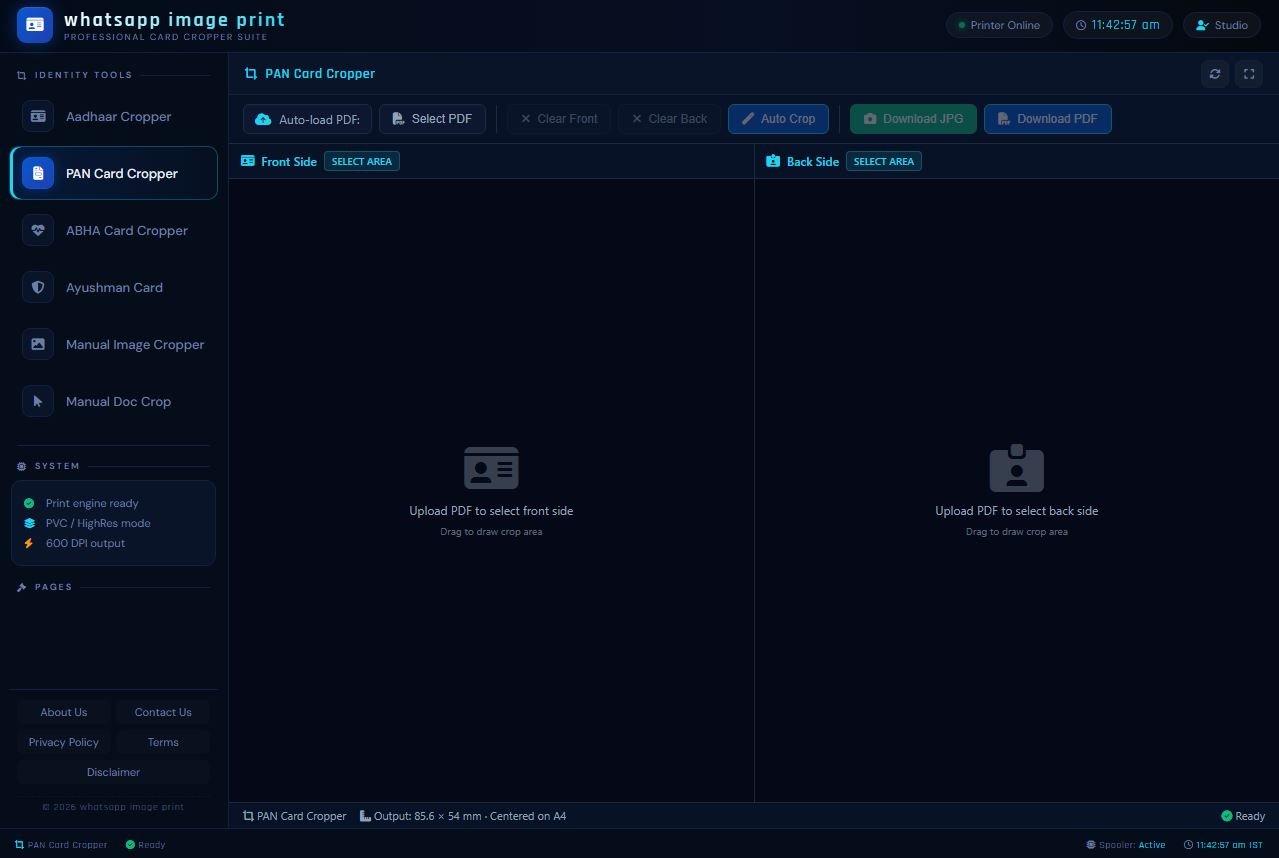
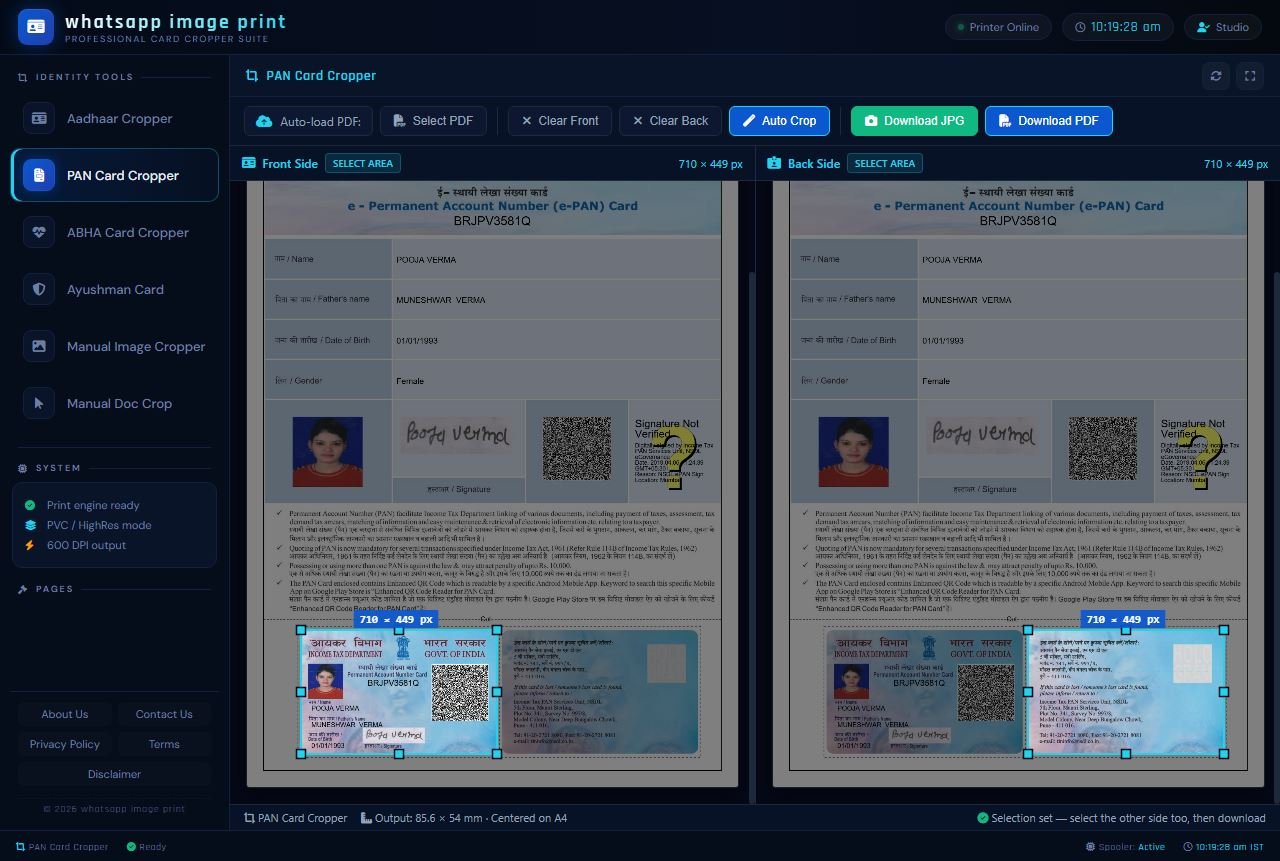
waimgprint.com par is tool ka sabse bada attraction aur sabse zyada istemal hone wala feature iska Auto Crop mode hai. Jaisa ki aap interface image mein dekh sakte hain, waimgprint.com ka dashboard bahut hi professional, clean, dark-themed aur straight-forward hai. Jaise hi aap apni e-PAN PDF is tool mein upload karte hain, aapko manually mouse se koi box draw karne ki ya borders milane ki zaroorat nahi padti. Hamara carefully likha gaya smart script automatically e-PAN ke letter head aur text content ko analyze karta hai aur bottom mein majood actual PAN card area ko millimeter-perfect accuracy ke sath detect kar leta hai. Aapko sirf upar diye gaye neele rang ke 'Auto Crop' button par ek single click karna hai. waimgprint.com ka system khud-ba-khud bilkul straight aur sharp edges ke sath card ke front aur back ko cut kar lega, jisse baad mein physical scissors ya cutter se kaatne par card ka border bilkul kharab nahi hota.
2. Original Filename Retention (Smart File Management)
Yeh waimgprint.com ke PAN tool ka ek sabse unique, exclusive aur users dwara sabse zyada demand kiya gaya feature hai. Jab cyber cafe ya CSC kendra wale din bhar mein 50 se 100 customers ke PAN cards download aur crop karte hain, toh computer ke 'Downloads' folder mein files ka naam mix ho jana ek aam problem hai. Internet par majood maximum dusre online tools kya karte hain? Wo downloaded file ka naam badal kar kuch random numbers ya letters (jaise 'download_image_12345.jpg' ya 'cropped_file_99.pdf') rakh dete hain. Isse kis file mein kiska PAN card hai, ye dhoondhna namumkin ho jata hai.
Lekin waimgprint.com mein humne aisi advanced coding approach lagayi hai ki jo actual naam aapki original PDF file ka tha, downloaded crop file ka naam bhi bilkul usi se milta-julta (retain) rahega. Udaharan ke liye, agar aapne NSDL se "Pooja_Verma_PAN_Card.pdf" naam ki file waimgprint.com par upload ki hai, toh hamara tool jab file wapas dega toh output file bhi "Pooja_Verma_PAN_Card.pdf" (ya uske aage cropped lag kar) ke naam se hi save hogi. Is choti si technical detail se aapko specific customer ki file baad mein search karne mein zero confusion hota hai aur business fast chalta hai.
3. Zero AI Architecture & Purely Functional Speed
Aaj kal market mein har dusri tech website apni marketing ke liye AI (Artificial Intelligence) features (jaise Ask AI chatbot, Auto-enhance photos, Cloud processing) lagakar apne system ko zabardasti bhari (heavy) aur slow bana deti hai. Jab aap apni dukaan par tez speed se identity documents print kar rahe hote hain, toh aapko in sab fancy cheezon ki bilkul zaroorat nahi hoti; aapko sirf speed chahiye. Isiliye waimgprint.com ki development team ne ek intentional (jaan-bhoojh kar) decision liya hai ki is PAN Cropper tool ko purely HTML, CSS aur robust JavaScript framework par hi banaya jayega. Isme koi external AI server call nahi hai. Iska seedha fayda ye nikal kar aata hai ki waimgprint.com instantly load hota hai, lagbhag offline jaisi lightning-fast speed deta hai, aur gaon-dehat ke low-end computers ya saalon purane laptops par bhi bina hang hue makkhan ki tarah smoothly kaam karta hai.
4. Custom Manual Area Selection (Failsafe Mode)
Government portals jaise NSDL aur UTIITSL apne e-PAN ke design, font aur format ko security reasons se samay-samay par thoda bahut update karte rehte hain. Agar kisi rare case mein, ya kisi customer dwara WhatsApp par bheji gayi bahut purani PDF mein hamara auto-crop system boundaries ko theek se detect nahi kar pata, toh waimgprint.com par aapke paas hamesha ek Manual Mode ka strong backup hota hai. Aap interface mein upar diye gaye 'Clear Front' aur 'Clear Back' buttons par click karke auto-selection hata sakte hain. Uske baad apne mouse (ya touch screen par ungli) ki madad se 'SELECT AREA' use kar sakte hain. Aap apni marzi se ek bounding box draw karke card ke chaaron edges ko manually set aur stretch kar sakte hain, jisse cropping error ke chances bilkul zero ho jate hain.
5. Maximum High-Resolution Output (600 DPI Print Ready)
PAN cards aur identity documents mein aapka naam, father's name, choti date of birth aur sabse zaroori PAN number bahut hi chote (micro) fonts mein likhe hote hain. Agar cropping process ke dauran image ko compress kar diya jaye, toh paper ya PVC par print aane par text blur (dhundhla) ho jata hai aur documents aage jaakar kahin scan nahi hote. waimgprint.com ka backend system by default internal processing mein 600 DPI (Dots Per Inch) output target maintain karta hai. Chahe aap Download JPG par click karke image save karein ya Download PDF par, waimgprint.com se nikalne wali final file ekdum crisp, vector-sharp aur highest quality ki hoti hai. Aap ise apne Epson L8050, Canon, HP ya kisi bhi modern high-resolution photo printer se perfectly HD print nikal sakte hain.
6. Perfect A4 Centered Alignment & Exact CR80 PVC Dimensions
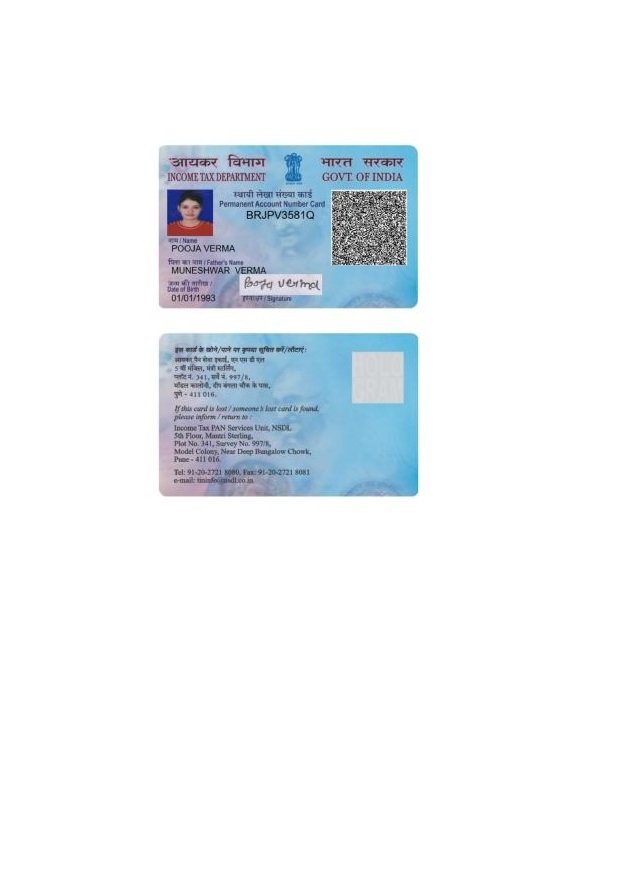
Jaisa ki aap is article ke niche di gayi final output image mein clear dekh sakte hain, jab aap waimgprint.com se final PDF output download karte hain, toh front side aur back side dono hisse ek standard A4 size ki blank sheet par bilkul vertical center mein align hokar aate hain. Iske alawa, inka physical output dimension globally accepted standard ID card size (jise CR80 kaha jata hai, yani lagbhag 85.6 mm x 54 mm) hota hai. waimgprint.com dwara kiye gaye is perfect centering aur alignment ka sabse bada ground-level fayda ye hai ki dukandar ko apne printer software mein koi custom margin, scale ya border adjust nahi karna padta. Bas PDF file open karein aur seedha keyboard se 'Print' (Ctrl+P) command de dein. Result hamesha perfect aayega.
🛠️ waimgprint.com PAN Card Cropper Use Karne Ka Step-by-Step Tarika
Hamari website waimgprint.com ka core design principle hi "Simplicity and Speed" hai. Is tool ko chalane ke liye aapko kisi special technical training ya coding background ki koi zaroorat nahi hai. Niche diye gaye 5 aasan aur straightforward steps ko follow karke koi bhi naya user apna e-PAN crop aur print-ready kar sakta hai:
- Step 1: Website Par Jayein: Sabse pehle apne computer, laptop ya smartphone ke kisi bhi updated web browser (Google Chrome sabse best hai) mein URL bar mein waimgprint.com type karein aur open karein. Website load hone ke baad, left side ke black navigation menu mein 'Identity Tools' section ke theek andar majood "PAN Card Cropper" option par click karein. Aapko ek clean dashboard dikhai dega.
- Step 2: Apni e-PAN File Upload Karein: Screen par bane hue center ke bade box mein jahan "Upload PDF to select front side" likha hai us par click karein, ya phir top menu bar mein diye gaye 'Select PDF' button par dabayein. Apne system ke File Explorer se NSDL ya UTI portal se download ki gayi apni original e-PAN PDF file ko dhoondh kar select karein aur open karein.
- Step 3: Document Password Daalein (Agar file locked hai): Security ke tehat sabhi e-PAN PDFs hamesha password protected aati hain. Iska PDF password hamesha us person (cardholder) ki full Date of Birth hota hai format DDMMYYYY mein. (Udaharan ke taur par: Agar poori janam tithi 01/01/1993 hai, toh bina kisi space ke password 01011993 hoga). waimgprint.com tool load hote hi top bar mein aapse password poochega, usme ye 8 digits daalkar 'Load PDF' par click karein.
- Step 4: Smart Crop Command Dein: File successful decrypt aur load hote hi dono PAN sides screen par alag-alag dikhne lagengi. Upar toolbar mein diye gaye neele rang ke bade 'Auto Crop' button par click karein. waimgprint.com ka system turant blue color ka rectangular selection marker card ke chaaron aur bilkul sateek fit kar dega.
- Step 5: Processed File Download Karein: Ek baar jab aap selection se satisfy ho jayein, toh top right corner mein diye gaye green color ke 'Download JPG' (agar aapko photo/image format mein save karna hai) ya blue color ke 'Download PDF' (agar aapko direct paper par print nikalna hai) button par click karein. Aapki file turant aapke system mein apne smart original filename format ke sath safe download ho jayegi.
💼 Yeh Tool Kin Businesses Ke Liye Ek "Game Changer" Saabit Ho Raha Hai?
Waise toh waimgprint.com ek public utility platform hai aur bharat ka koi bhi aam nagrik iska use bilkul muft aur aasaani se kar sakta hai, lekin kuch specific professional sectors aur businesses ke liye ye tool rozana ghanton ki mehanat aur labour cost bachane wala ek vardaan (boon) saabit ho raha hai:
- Common Service Centers (CSC VLE) aur Jan Seva Kendras: In kendro par har subah se lekar shaam tak darjano customers naye PAN card, Aadhaar card, aur Ayushman card print karwane aate hain. Bheed (rush) ke samay mein Photoshop khol kar har customer ke liye manual cropping karna bahut mushkil aur frustrating hota hai. waimgprint.com ki madad se ek CSC operator sirf 10 seconds mein card perfectly ready karke apne customer ko de sakta hai, jisse unki dukan ki daily efficiency dugni ho jati hai aur customer wait time aada.
- Chartered Accountants (CA) & Tax Consulting Firms: March ke mahine mein aur ITR filing ke season mein CAs aur accountants ko apne hazaron clients ke PAN cards record mein digital roop mein rakhne padte hain. Ek single A4 page par perfectly aligned front-back PDF save karne se unka digital document management system (DMS) aur office filing system bahut clean, searchable aur organized rehta hai. Iske liye wo waimgprint.com par heavily depend kar sakte hain.
- Photography Studios & PVC Smart Card Printers: Jo dukandar specially premium plastic PVC cards print karne ka business karte hain (jaise Magicard, Evolis ya Fargo printers ka use karke), unhe borderless printing ke liye perfectly 85.6mm x 54mm dimension ki strict zarurat hoti hai. waimgprint.com ka tool exactly wahi millimeter-perfect dimension output deta hai jisse unke mehnge PVC blank cards waste nahi hote.
- Mobile First Users: Kyunki waimgprint.com poori tarah se ek modern responsive browser-based tool hai, agar aapke paas dukaan par PC ya laptop nahi hai (ya light chali gayi hai), tab bhi aap is website ko apne smartphone (Android ya iPhone) par open karke aasaani se apna e-PAN crop kar sakte hain aur high-res JPG directly apne phone ki memory ya WhatsApp par save rakh sakte hain.
⚖️ In-Depth Comparison: waimgprint.com vs. Traditional Image Editors (Photoshop/Word)
Agar aap abhi bhi apne mann mein soch rahe hain ki jab mere paas computer mein pehle se pirated ya licensed Photoshop pada hai, toh main apna purana tareeka chhodkar is naye web tool waimgprint.com par kyun shift hon? Toh niche diya gaya ye detailed technical comparison table aapke saare doubts aur hesitation hamesha ke liye clear kar dega:
| Features / Comparison Metric | PAN Cropper by waimgprint.com | Photoshop / CorelDraw / MS Word |
|---|---|---|
| Overall Working Speed | Ekdum Super-Fast. Website kholne se lekar crop hone tak sirf 1-click aur mushkil se 10 se 15 seconds ka samay lagta hai. | Bahut Slow process. Application open hone, file import karne aur manual cropping setup mein kam se kam 5 se 10 minute lagte hain. |
| System Software Dependency | Zero Dependency. Aapko sirf ek basic internet browser aur aam specification wala (2GB RAM) PC ya mobile chahiye. Koi installation nahi. | Heavy desktop software hamesha download aur install karna padta hai. Ye RAM, processor aur hard drive storage heavily consume karta hai. |
| Smart Original File Naming | Haan, waimgprint.com download hone par aapki original file ka naam retain karta hai jisse record dhoondhna easy hota hai. | Nahi, softwares mein aapko hamesha manually "Save As" karke naya naam type karna padta hai, jo time waste karta hai. |
| Output Dimensional Accuracy | Pre-coded algorithm ke zariye standard ID size (85.6 x 54 mm) automatically set aur lock ho jata hai. | Aapko screen rulers aur guidelines use karke manually scale aur dimensions inches/cm mein set karne padte hain. |
| Learning Curve & Ease of Use | Bilkul nahi. Interface itna zyada simple aur intuitive hai ki koi naya vyakti ya bacha bhi pehli baar mein chala le. | Tools, layers, mask, resolution aur canvas management ki achi khaasi technical knowledge zaroori hoti hai. |
| Direct Password Unlocking | Haan, same interface window mein upar password box diya gaya hai, wahi par directly file decrypt ho jati hai. | Softwares aam taur par e-PAN PDF import nahi karte. Pehle aapko internet par kisi third-party PDF unlocker site se usko unlock karna padta hai. |
🔒 Privacy Aur Data Security: 100% Client-Side Processing Architecture
Financial aur Identity documents (jaise Aadhaar, PAN) ke online mamle mein, data privacy aur information security aaj ke daur ka sabse bada aur sensitive mudda hai. Hum waimgprint.com ki team is baat ko poori zimmedari ke sath samajhte hain ki PAN card aapka sabse important financial pillar hai, jiska galat hathon mein padna identity theft ka kaaran ban sakta hai. Isiliye, jab humne waimgprint.com ko design kiya, toh data privacy aur user safety ko apni foundational priority (sabse upar) rakha hai.
Internet par dusri websites aam taur par aapka PDF pehle apne foreign server par upload karti hain aur wahan crop karke wapas bhejti hain jisme risk hota hai. Lekin hamara waimgprint.com ka PAN Card Cropper aur is platform ke baaki sabhi tools exclusively 100% Client-Side Processing (Browser-based execution) technology par kaam karte hain.
Is technical term ka ek aam user ke liye seedha sa matlab yeh hai ki: Jab aap apni PAN PDF file upload karne ke liye click karte hain, toh wo PDF file actually mein hamare kisi web server, foreign cloud platform, ya backend database mein internet ke zariye upload ya transfer nahi hoti hai. Saari ki saari document file reading, password decryption process, JavaScript based cropping, aur naya image generation aapke apne personal computer, laptop ya mobile ke web browser (Google Chrome, Firefox) ki aantarik memory (internal RAM) ke andar hi offline tarike se completely securely run hota hai. Is platform mein koi remote backend database involved nahi hai jo files ko collect kare. Jaise hi aap waimgprint.com ki website ka tab band (close) karte hain ya page refresh karte hain, browser memory clear hote hi aapka saara data instantly flush out (permanently delete) ho jata hai. Isliye, as a business owner ya individual user, aap is tool ka use poore 100% confidence, shanti aur bina kisi darr ke din-raat kar sakte hain.
❓ Ultimate Frequently Asked Questions (FAQs) - PAN Cropping ke Sabhi Jawab
Hamare naye users aur dukandaron dwara waimgprint.com par PAN card cropping, printing aur technical problems se jude sabse aam (common) sawalon ke extremely detailed jawab yahan padhein:
🎯 Nishkarsh (Master Conclusion)
Financial digitization ke is nayi sadi (century) aur advanced yug mein jahan duniya ka har kaam internet ki speed par tezi se ho raha hai, wahan purane, clunky aur slow tareeko se document formatting aur printing karna aapke professional time, energy aur business ke total revenue dono ke liye bahut nuksandayak hai. Ek business owner ka time bahut keemti hota hai. waimgprint.com ka ye officially optimized PAN Card Cropper Tool is baat ka behtareen aur jeeta-jagta udaharan hai ki kaise ek simple, user-friendly, fast, aur smartly coded modern web utility software aapke din bhar ke ghanton ke technical struggle ko poori tarah khatam kar sakti hai.
Is unique tool ka sabse bada plus point (jo ise sabhi se alag banata hai) iska zero external software requirement (kuch download nahi karna), smart original file naming system, aur completely secure client-side private environment hai, jahan bina kisi privacy-invading AI intervention ke aapka identity cropping ka ahem kaam seconds mein poore perfection ke sath nipat jata hai.
Hamari is in-depth technical guide mein dikhayi gayi HD images se aapko ekdam clear ho gaya hoga ki waimgprint.com ka dashboard interface chalane mein kitna adhik aasan (user-friendly) hai aur iska final print result kitna zyada professional, sharp aur visually clean hai. Toh ab MS Word ya purane Photoshop ke complex layers aur crop box settings mein apna keemti samay aur mehanat waste karna hamesha ke liye band karein, aur is fast, modern aur smart tareeke ko apne dainik business mein apnayein.
Hum aapse haardik anurodh (request) karenge ki aaj hi apne computer ya mobile browser par open karke is behtareen PAN Card Cropper Tool ko personally waimgprint.com par visit karke khud live test karein. Agar is tool ne sach mein aapki dukaan ka time bachaya hai, aapka kaam aasan kiya hai, aur aapko hamari team ki ye choti si magar solid technical koshish pasand aayi hai, toh kripya is master guide aur website ke link ko apne sabhi CSC groups, Chartered Accountant doston, Jan Seva Kendras, aur digital document centres ke sabhi professional WhatsApp aur Telegram groups mein zaroor share karein, taaki unhe bhi sikhne ko mile aur unki bhi business efficiency mein badhotari (growth) aur madad ho sake.
Official Note: Hamari website waimgprint.com par Identity Tools ki ye helpful series yahi nahi rukne wali, ye lagaatar badh aur aage develop ho rahi hai. Popular Aadhaar aur PAN cropper ke successful release ke baad, hamari technical team bahut jald naye highly-demanded tools jaise ABHA (Health) Card Cropper, Ayushman Card Cropper, aur Manual Document Crop ke liye bhi aisi hi in-depth guides, features aur updates laane wali hain. In sabhi premium naye updates, free tools aur business ke time-saving printing tricks ko sabse pehle janne aur sikhne ke liye is waimgprint.com ke official tech blog se niyamit roop se jude rahein! Happy and Safe Printing!