Aadhaar Card Cropper Tool: 1-Click Mein e-Aadhaar PDF Ko Perfect Size Mein Crop Aur Print Karein
Aaj ke modern aur fully digital daur mein Aadhaar card Bharat ke har nagrik ke liye sabse zaroori aur mahatvapurna identity proof ban chuka hai. Chahe aapko kisi bhi sarkari ya private bank mein apna naya savings account khulwana ho, naya mobile SIM card lena ho, kisi sarkaari yojana (government scheme jaise PM Kisan, ration card, ya housing scheme) ka labh uthana ho, ya phir apne baccho ka naye school ya college mein admission karwana ho, Aadhaar card ki hard copy ya physical printout ki zaroorat har jagah sabse pehle padti hai. Is digital revolution ke chalte, UIDAI ki official website se hum apna e-Aadhaar PDF bahut hi aasaani se apne mobile ya computer par download toh kar lete hain, lekin ek aam user ya document printing business karne wale ke liye asal pareshani tab shuru hoti hai jab hume us download ki gayi PDF file ka print nikalna hota hai ya usme se main ID card wale hisse ko perfectly crop karna hota hai. Yahi par waimgprint.com ka role shuru hota hai.
Aam taur par, UIDAI se download kiya gaya e-Aadhaar ek poore A4 size ke paper par ek lamba sa document hota hai. Upar ke hisse mein aapki personal details, UIDAI ka official letter format, guidelines, aur important instructions hote hain, aur bilkul niche ke hisse (bottom corner) mein aapka main Aadhaar card (jisme Front aur Back side dono hote hain) chhapa hota hai. Agar aap ek normal internet user hain, ya phir aapka apna koi Common Service Center (CSC), Cyber Cafe, Jan Seva Kendra, ya Digital Document Print Centre hai, toh aapko bakhubi pata hoga ki us badi si PDF file mein se sirf card wale hisse ko safely cut karna, use ek perfect identity card size (lagbhag 85.6 mm x 54 mm) mein set karna, aur ek naye A4 page par bilkul center mein align karna kitna zyada thakau, time-consuming aur complex kaam hai. Is problem ka sabse smart solution waimgprint.com par uplabdh hai.
Is chhote se formatting ke kaam ke liye log saalon se Adobe Photoshop, Microsoft Word, CorelDraw, ya Illustrator jaise bhari-bharkam aur mehnge editing softwares ka istemal karte aa rahe hain. Pehle Photoshop open karo, PDF ka password dalkar file import karo, manually resolution aur DPI set karo, phir manually crop tool se line aur borders milao, aur aakhir mein ek naye canvas par drag-and-drop karke print command do. Is poori manual process mein ek expert operator ke bhi 5 se 10 minute ka samay asaani se barbaad hota hai. Agar aapki dukan par rush hour chal raha hai aur din mein 50 customers khade hain, toh ye manual process bilkul bhi practical nahi hai, aur kai baar image ki quality ya text bhi kharab ho jati hai. waimgprint.com in sabhi manual steps ko completely eliminate kar deta hai.
Lekin ab aapko in sab purane, slow aur mehnate tarikon mein padne ki koi zaroorat nahi hai! waimgprint.com par humne aapke is daily technical struggle ko samajhte hue ek behtareen, ultra-fast aur smart utility tool develop kiya hai — jiska naam hai Aadhaar Card Cropper. Ye ek aisi revolutionary web utility hai jo aapke ghanton ke document formatting ke kaam ko sirf aur sirf kuch seconds mein aur wo bhi bina kisi human error ke complete kar deti hai. Is deeply detailed aur comprehensive blog post mein hum aapko waimgprint.com ke is premium tool ke saare features, isko safely use karne ka exact step-by-step tarika, security protocols, aur iske aneko business faydon ke baare mein vistar se batayenge.
🚀 waimgprint.com Aadhaar Card Cropper Tool Aakhir Hai Kya?
waimgprint.com ka Aadhaar Card Cropper ek fully optimized, browser-based utility tool hai jise specifically e-Aadhaar PDFs ko locally read aur process karne ke liye high-end JavaScript framework par design kiya gaya hai. Is advanced tool ka sabse mukhya kaam (main objective) hai aapki original UIDAI se download ki gayi e-Aadhaar PDF file ko aapke browser system mein securely load karna, us document ke andar se main ID card (Front aur Back portion) ki boundaries ko apne smart algorithm se automatically detect karna, aur use ek globally standard, high-resolution print-ready size mein crop karke aapko turant wapas dena. Ye sab kuch waimgprint.com ke secure client-side architecture par hota hai.
Chahe aapko apne premium customer ke liye ek high-quality ka PVC card (Smart Card) plastic printer se print karna ho, ya phir normal A4 size glossy paper par high-quality photo print nikalna ho, waimgprint.com ka ye tool aapko ek dam sateek (100% accurate) millimeter-perfect dimension nikal kar deta hai. Sabse achi aur rahat ki baat ye hai ki is tool ko chalane ke liye aapko apne computer, laptop ya mobile mein koi bhi third-party heavy software install ya download nahi karna padta. Ye tool poori tarah se aapke device ke web browser (jaise Google Chrome, Mozilla Firefox, Brave, ya Microsoft Edge) par smoothly aur seamlessly kaam karta hai. waimgprint.com ki Client-side processing technology ki wajah se aapki heavy se heavy file bhi ultra-fast process hoti hai aur data security level bhi highest industry standard par rehta hai, kyunki aapki personal PDF file kabhi bhi kisi anjaan remote server ya cloud par upload nahi hoti hai.
🌟 waimgprint.com Tool Ke Main Features: Ek Detailed Analysis
Internet market mein majood baaki sadharan, ad-filled aur slow image cropping websites ke mukable, hamara waimgprint.com ka Aadhaar Card Cropper tool bahut hi advanced, ad-free, aur document-specific functionalities ke sath aata hai. Humne waimgprint.com is tool ko banate waqt simplicity (aasaani) aur uncompromised performance dono par focus kiya hai, taaki ek naya user bhi ise pehli baar mein samajh sake. Niche iske sabhi behtareen aur premium features ki deep detail di gayi hai:
1. 1-Click Auto Crop (Smart Detection Technology on waimgprint.com)
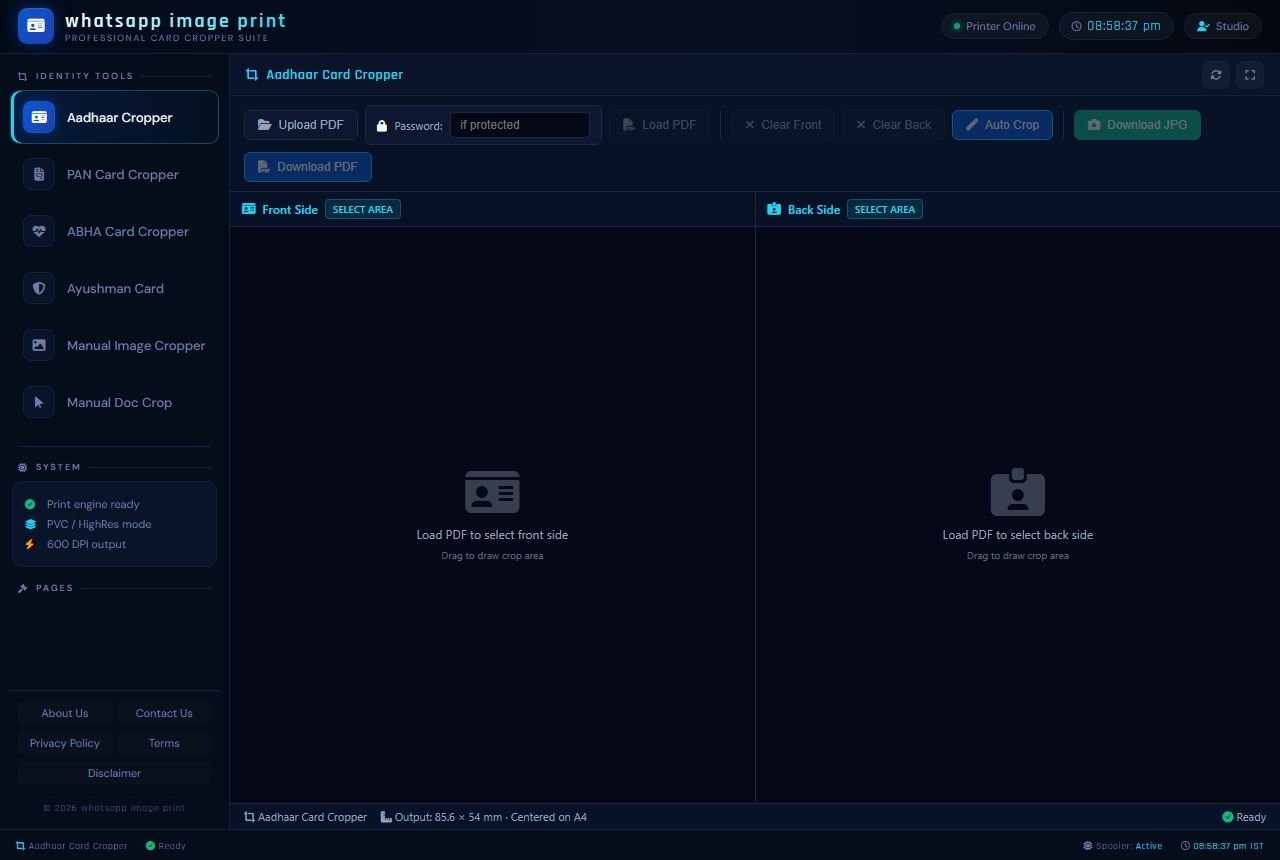
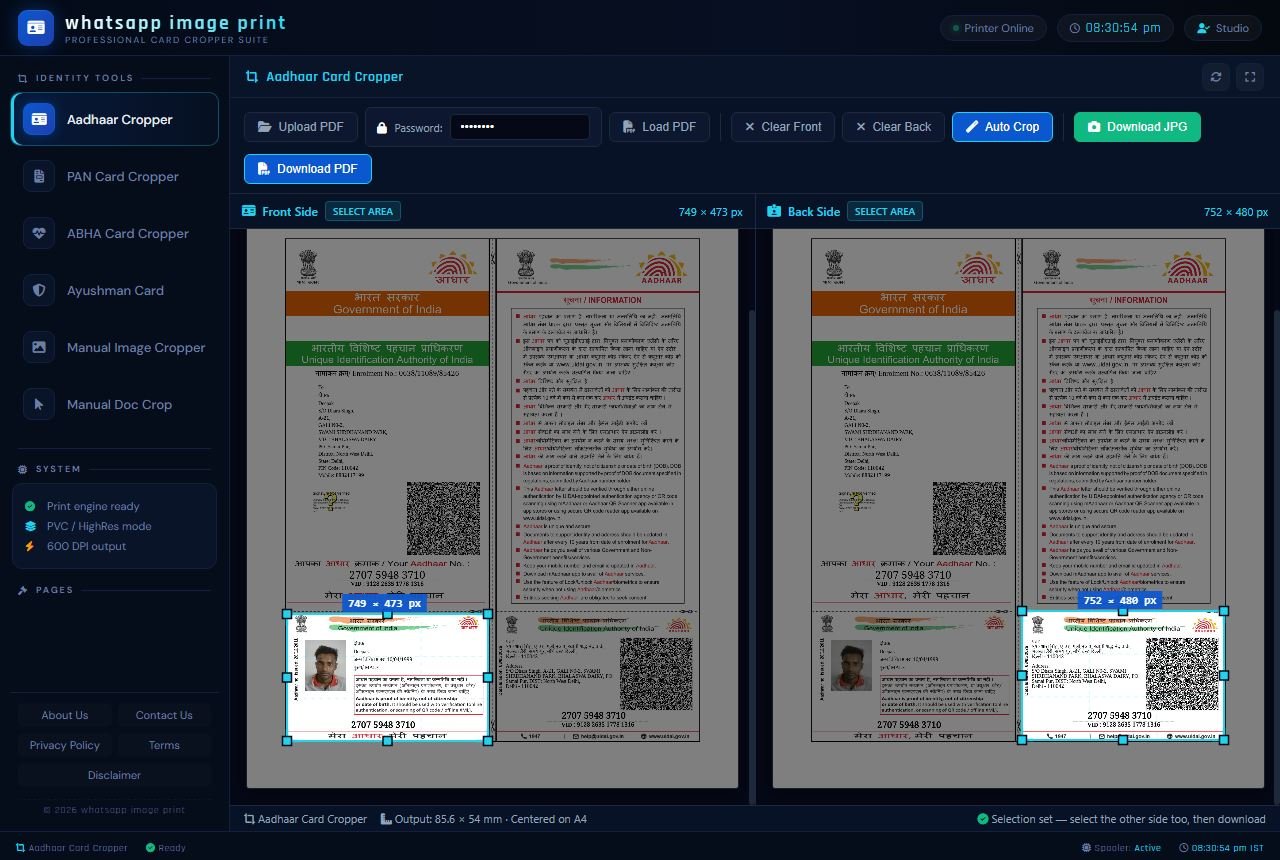
Is tool ka sabse bada attraction aur cyber cafe owners dwara sabse zyada use hone wala feature iska Auto Crop mode hai. Jaisa ki aap niche di gayi image mein dekh sakte hain, waimgprint.com hamari website ka user interface bahut hi clean, distraction-free, dark-themed aur highly professional hai. Jaise hi aap apni e-Aadhaar PDF system mein upload karte hain, waimgprint.com ka hamara locally executed smart detection algorithm automatically pure document ko millisecond mein scan karta hai aur ID card ke sahi borders ko recognize kar leta hai. Aapko bas upar diye gaye nile rang ke 'Auto Crop' button par ek single click karna hai. Tool khud-ba-khud Front side aur Back side ko perfectly crop kar lega, bina kisi tedious manual adjustment ke. Isse aapko bilkul straight aur sharp edges milte hain, jo baad mein lamination ke baad scissor ya cutter se kaatne mein aasan hote hain. Ye feature waimgprint.com ko dusre platforms se alag banata hai.
2. Manual Crop Mode (Custom Area Selection Tool)
Hum waimgprint.com ki development team mein is baat ko samajhte hain ki kabhi-kabhi UIDAI apni official website par e-Aadhaar ke design ya print format mein chote-mote badlaav kar deta hai. Ya phir ho sakta hai ki aapke paas WhatsApp par aayi hui koi purane format ki PDF ho jisme image quality low hone ke karan auto-detection engine theek se kaam na kare. Aisi specific aur rare situations ko handle karne ke liye humne waimgprint.com par ek robust Manual Mode ka fail-safe option bhi diya hai. Tool screen par upar 'SELECT AREA' ka option majood hai. Aap apne mouse (ya mobile par finger) ka use karke apne desired crop area par ek bounding box draw kar sakte hain aur uske corners ko apne hisaab se drag karke adjust kar sakte hain. Isse aapko har mushkil situation mein pixel-perfect cropping ka 100% control milta hai. Ye flexibility sirf waimgprint.com par hi milti hai.
3. Inbuilt Password Unlocker (Time-Saving Feature by waimgprint.com)
Ye baat har aam aadmi aur tech user janta hai ki jab aap UIDAI ke portal se apni e-Aadhaar receipt download karte hain, toh wo security reasons ke karan ek password-protected (highly encrypted) PDF file hoti hai. Aam taur par logo ko aisi locked file ko kisi cropping software (jaise Photoshop) mein kholne se pehle internet par dusri third-party websites (PDF unlockers) par ja kar uska password permanently hatana padta hai, jisme unka kafi time aur bandwidth kharab hota hai. Lekin waimgprint.com ke hamare platform par aapko ye lamba jhanjhat nahi palna padega! waimgprint.com tool ke interface mein top menu bar par ek 'Password' input field explicitly aur clearly di gayi hai. PDF file upload karne se theek pehle ya load hone ke baad, aap wahan apna official 8-character ka password (jo aapke naam ke shuruati 4 akshar aur janam ka saal hota hai) enter karein aur 'Load PDF' par click karein. waimgprint.com ka internal system directly file ko browser mein hi decrypt karke instant processing start kar dega. Isse aapka precious time bachta hai.
4. Dual Download Formats (PDF & JPEG Support on waimgprint.com)
Cropping ka technical kaam pura hone ke baad, final result ko system mein download karne ke liye humne waimgprint.com users ko puri azaadi aur flexibility di hai. Aap apni current zarurat ke hisaab se apna preferred format chun sakte hain:
Download PDF: Agar aap ek CSC ya digital document shop chalate hain aur aapko apne Epson, Brother ya Canon printer se turant A4 sheet par print command deni hai, toh PDF format hi sabse best aur most professional choice hoti hai. waimgprint.com se nikla hua PDF format use karne se font aur QR barcode ki quality print hone par bilkul loose nahi hoti, aur image bilkul vector-like sharp aur HD rehti hai.
Download JPG: Agar aapko ye cropped ID card physical print nahi karna, balki kisi online sarkaari form (jaise passport form, scholarship portal, RTO form) mein upload karna hai, apne kisi remote client ko WhatsApp, Telegram ya email par forward karna hai, ya sirf future use ke liye apne mobile phone ki gallery mein digitally save rakhna hai, toh aap easily waimgprint.com se high-quality JPEG format mein bhi isko download kar sakte hain. Is format mein downloaded files light-weight hoti hain jisse storage management aasan rehta hai. Ek aur khas baat ye hai ki jab aap apni file download karte hain, toh wo apne original filename ke sath hi retain aur save hoti hai, jisse aapko apne system mein file dhoondhne aur unhe easily organize karne mein koi bhi extra pareshani nahi hoti.
5. Perfect Print-Ready A4 Alignment (Professional Output via waimgprint.com)
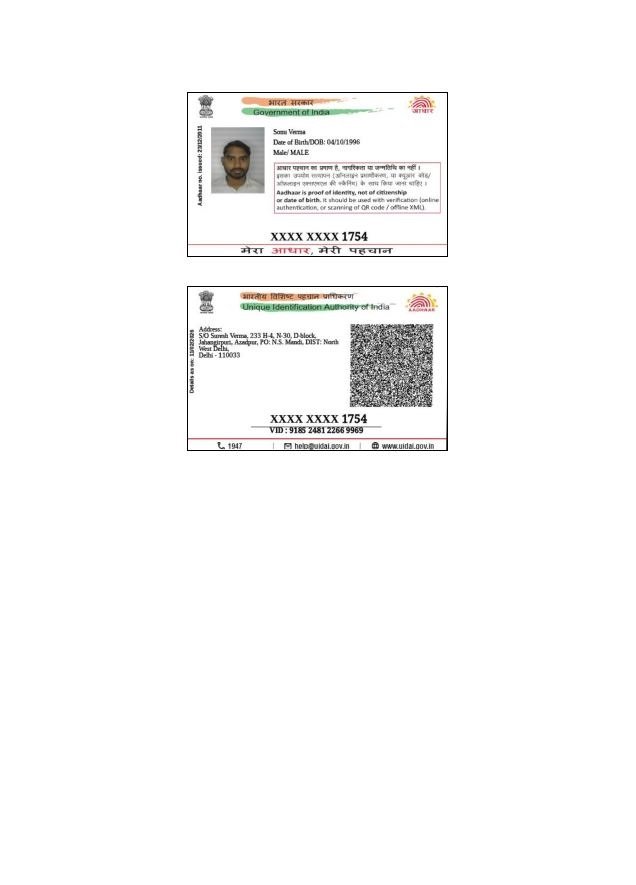
Agar aap niche di gayi final output image ko dhyan se dekhein, toh aapko turant samajh aayega ki waimgprint.com ka final result kitna zyada clean, symmetrical aur professional nikal kar aata hai. Jab aap waimgprint.com se final PDF download karte hain, toh Front side aur Back side dono hisse ek hi A4 blank page par bilkul center mein aur ek dusre ke upar-niche (vertically) perfectly align hokar aate hain. Output size manually adjust kiye bina exactly 85.6 x 54 mm (Standard CR80 size) hota hai. Is automated centering aur precise alignment ka sabse bada ground-level benefit ye hai ki aap bina kuch soche direct keyboard se (Ctrl+P) print command de sakte hain. Print bahar aane ke baad card ko scale se nap kar kaatne mein aapse ya aapke staff se koi galti nahi hoti, jisse mehnga glossy paper waste nahi hota.
🛠️ waimgprint.com Tool Ko Step-by-Step Kaise Use Karein? (Complete Comprehensive Tutorial)
waimgprint.com ke Aadhaar Card Cropper ko specifically is tarah se design aur program kiya gaya hai ki iska user interface (UI) ekdam simple, intuitive aur lightning-fast rahe. Isme humne kisi bhi tarah ki complex settings, confusing menus ya unnecessary AI (Artificial Intelligence) features ko nahi joda hai jo ki site ko slow karein ya privacy par sawal uthayein. Ek bilkul naya user jisko basic computer chalana aata hai, wo bhi ise pehli baar mein bina kisi tutorial ke chala sakta hai. Phir bhi, aapki suvidha ke liye yahan waimgprint.com ka ek detailed step-by-step process samjhaya gaya hai:
- Step 1: waimgprint.com Website Par Visit Karein: Sabse pehle apne computer ya smartphone ke kisi bhi safe browser (jaise Chrome) mein waimgprint.com type karke open karein. Page load hone ke baad, left side mein majood black navigation menu se 'Identity Tools' section dhoondhein aur uske theek andar "Aadhaar Cropper" option par click karein. Dashboard turant load ho jayega.
- Step 2: Apni Local PDF File Upload Karein: Jaise hi waimgprint.com tool ka main interface open ho, top-left corner par dikh rahe prominent 'Upload PDF' button par mouse se click karein. Ek dialog box khulega, wahan se apne computer ki hard drive, Downloads folder ya mobile ki internal memory se original UIDAI se downloaded e-Aadhaar PDF file ko select karke open par click karein.
- Step 3: Document Password Enter Karein: Kyunki hum jante hain ki e-Aadhaar ki files strictly secure aur locked hoti hain, aapko top menu bar mein diye gaye 'Password' input field mein us PDF ka specific password type karna hoga. (Jankari ke liye bata dein, password hamesha aapke legal naam ke shuruati 4 akshar angrezi ke capital letters mein, aur aapke janam ka saal yaani Birth Year hota hai. Example: AMIT1988). Sahi Password dalne ke baad uske bagal mein diye gaye 'Load PDF' button par click karein. waimgprint.com isko instantly render kar dega.
- Step 4: Smart Cropping Process Ko Start Karein: File securely screen par load hone ke baad, agar aapko seconds mein fast result chahiye toh sidha upar diye gaye blue color ke 'Auto Crop' button par click karein. waimgprint.com ka Tool automatically bright blue color ke selection boxes front aur back ID area par perfectly set kar dega. Agar kisi reason se aap manual adjust karna chahte hain, toh interface mein diye 'Clear Front' ya 'Clear Back' button daba kar mouse drag karke khud ka selection bana sakte hain.
- Step 5: Final Processed Document Download Karein: Area selection successfully ho jane ke baad, screen ke top right hisse se green color ke 'Download JPG' button par click karein agar aapko digital form mein upload karne ke liye high-quality image file chahiye. Ya phir top right hisse mein hi majood blue color ke 'Download PDF' button par click karein agar aapko directly apne printer se print nikalne ke liye ek perfect A4 aligned document chahiye. waimgprint.com file ko aapke system mein safe save kar dega.
💼 waimgprint.com Ye Tool Kis Ke Liye Sabse Zyada Labhdayak (Highly Beneficial) Hai?
Waise toh waimgprint.com ek esi universal public utility tool website hai jo har us bharatiya nagrik (Indian citizen) ke kaam aa sakti hai jiske paas apna smartphone aur internet hai, lekin kuch specific businesses, document professionals aur organizations ke liye waimgprint.com ka ye tool rozana ka ghanton time bachane wala ek sacha "Game Changer" saabit ho raha hai:
- Common Service Centers (CSC VLE) & Cyber Cafes: Agar aap Delhi, Mumbai ya Bharat ke kisi bhi gaon-shehar mein ek busy digital document centre, emitra ya CSC chalate hain, toh din bhar mein aapke paas darjano, balki saikdon customers sirf Aadhaar print karwane, lamination karwane ya PVC card banwane aate honge. Bheed wale samay (rush hours) mein purane Photoshop par har ek customer ke document ko individually import aur crop karne mein aapka bahut valuable time aur mental patience lagta hai. waimgprint.com ki intelligent processing madad se wahi Photoshop wala thakau 5 minute ka kaam ab aap sirf 5 se 10 second mein khatam kar sakte hain. Isse customers ki lambi line dukaan par jaldi clear hoti hai, service fast hoti hai aur practically aapki daily income multiple times badhti hai.
- Photography Studios & Commercial PVC Printing Shops: Jo print shops high-quality plastic PVC smart cards, identity cards, employee badges aur heavy plastic cards print karne ka direct business karti hain, unhe absolute perfect millimeter dimensions ki sakht zaroorat hoti hai. Agar dimension 1 mm bhi out hua toh card printer tray mein fass sakta hai. waimgprint.com ka hamara tool default roop se bilkul accurate 85.6 mm x 54 mm ka pre-set output generate karta hai. Ye exact dimension har international standard PVC card printer (jaise Epson L8050, Magicard Pronto, Evolis ya Fargo) ki ID tray ke liye ekdam perfect fit hota hai. waimgprint.com use karne se blank cards ki wastage zero ho jati hai.
- Company HR Departments & School Administrations: Badi corporate offices mein naye employees ki joining (onboarding) ke samay ya schools mein naye baccho ke admission ke time unka identity data verify aur physical file mein maintain karne ke liye ID proofs ki hard copies lene padte hain. Ek single standard A4 page par perfectly cropped front aur back side rakhne se HR aur administration ka file management, document sorting aur physical documentation process bahut aasan, space-saving aur visually clean ho jata hai. Unke office staff ke liye waimgprint.com ek daily use karne wala tool ban jata hai.
- Travel Agents & Visa Consultants: Travel industry mein clients ke documents (Aadhaar, Passport) baar-baar alag-alag embassies ke portal par upload karne hote hain jahan size aur format ki restrictions hoti hain. waimgprint.com se wo easily Aadhaar ko clean JPG mein crop karke turant apne digital folders mein organize kar sakte hain, jisse visa application process fast ho jati hai.
⚖️ In-Depth Comparison: waimgprint.com Aadhaar Cropper Tool vs. Traditional Softwares (Photoshop/Word)
Agar aap abhi bhi apne man mein ye technical sawal soch rahe hain ki jab mere paas pehle se mere computer mein licensed ya pirated editing software install hai, toh main is nayi website waimgprint.com ko apne business workflow ke liye kyun use karun? Toh niche diya gaya ye direct aur detailed comparison chart aapke saare professional doubts aur hesitations hamesha ke liye clear kar dega:
| Feature / Functionality Point | waimgprint.com Aadhaar Cropper | Traditional Photoshop / MS Word |
|---|---|---|
| Total Time & Processing Speed | Extremely Fast. Sirf 1-click aur pura kaam 10-15 seconds mein output ready. | Very Slow. Har single file ke setup, loading aur manual cut mein 5 se 10 minute lag jate hain. |
| Technical Editing Skills Required | Absolute Zero. Koi bhi non-technical person ya dukaan ka naya ladka isko chala sakta hai. | Layers, mask, DPI resolution aur crop tools ki advanced achi knowledge zaroori chahiye. |
| Direct Password Unlock Feature | Yes, Inbuilt input box upar hi diya gaya hai. Same single page par file instantly unlock ho jati hai. | No, Pehle kisi dusri external PDF site se ja kar file upload karke unlock karna padta hai, phir software mein lana padta hai. |
| Perfect Final Output Size Validation | Yes, Automatic 85.6 x 54 mm (Standard PVC ID Size) system dwara locked aur set ho jata hai. | No, Manually mouse se scale karna, transform karna aur screen rulers se measure karna padta hai jo risky hai. |
| Hardware System Load & Installation | Lightweight Web browser based tool hai. Koi exe installation ya updates nahi chahiye. | Heavy desktop software hai, purane ya slow RAM wale PCs ko heat-up aur hang kar deta hai. |
🔒 Privacy Aur Data Security: waimgprint.com Ki Sabse Badi Prathmikta (Top Priority)
Jab bhi internet ki duniya mein kisi government identity document (jaise Aadhaar card, PAN card, ya Voter ID) ko online kisi portal par upload karne ki baat aati hai, toh har user ke dimag mein sabse pehla aur sabse zaroori dar data security aur privacy breach ka hota hai. Hum as a responsible developer waimgprint.com par ye baat bahut gehrai se samajhte hain ki Aadhaar ek highly sensitive, confidential aur personal document hai jisme aapka pura naam, ghar ka address, date of birth, aur sabse ahem aapka fingerprint/iris verify karne wala encrypted biometric QR code shamil hota hai. Is data ka galat istemal identity theft ka kaaran ban sakta hai.
Isi dar ko hamesha ke liye khatam karne ke liye, hamara waimgprint.com ka Aadhaar Card Cropper tool 100% Client-Side Processing (Browser-based execution) system architecture par deeply banaya gaya hai. Internet ki is advanced technical term ka ek normal user ke liye simple aur clear matlab ye hai ki: Jab aap hamari site par 'Upload PDF' par click karte hain, toh aapki sensitive file hamare kisi remote web server, foreign cloud platform, ya backend storage mein upload ya internet par transfer bilkul nahi hoti. Poori ki poori image cropping process, complex password decryption, aur final output PDF generation ka saara technical load aapke apne computer ya mobile phone ke local web browser (jaise Chrome/Edge) ki temporary internal memory (RAM) ke andar hi securely run hota hai. waimgprint.com website ka koi central backend database ya hidden server nahi hai jo aapke uploaded documents ko chupke se store, read ya analyze kare. Jaise hi aapka kaam khatam hota hai aur aap hamari waimgprint.com website ka tab band (close) karte hain ya us page ko refresh karte hain, aapka upload kiya gaya saara data aapki local RAM se instantly aur permanently flush (delete) ho jata hai. Isliye, as a responsible business owner ya private citizen, aap is advanced waimgprint.com tool ka istemal bina kisi privacy ke darr ke aur poore 100% confidence ke sath din-raat kar sakte hain.
❓ Ultimate Frequently Asked Questions (FAQs) - waimgprint.com ke Baare Mein Sabhi Jawab
Apne naye visitors aur regular loyal users ke sabhi common doubts aur technical confusions ko permanently clear karne ke liye humne yahan waimgprint.com par croping aur printing se jude top 15 aam sawalon (FAQs) ke detailed, accurate aur in-depth jawab diye hain:
🎯 Nishkarsh (The Ultimate Conclusion About waimgprint.com)
Digital India ke tezi se badhte hue is dynamic daur mein jahan har physical identity ek digital form le chuki hai, Aadhaar card download, scaling, printing aur document formatting ka traditional kaam ab utna mushkil, tedious aur thakane wala nahi raha jitna wo pichle 5-10 saalon tak hua karta tha. waimgprint.com ka ye state-of-the-art aur meticulously designed Aadhaar Card Cropper tool ek aisi common business zarurat aur technical software problem ko poori efficiency ke sath pura karta hai jo har ek CSC VLE, Digital Studio owner, Jan Seva operator, aur aam internet user lagbhag rozana apne professional kaam ke dauran face karta hai. Is platform ka exceptionally powerful 1-click auto crop smart system, natively inbuilt password decryption browser reader, aur highly flexible dual format (PDF/JPG) output download options ise pure internet par majood baaki sabhi dusre slow aur generic cropping tools se bahut hi zyada fast, uniquely alag aur infinitely behtar banate hain. Iske sath hi waimgprint.com ki zero privacy-compromise policy user ke trust ko multiple times badha deti hai.
Hamari is highly detailed aur comprehensive article mein strictly share ki gayi original images ko carefully dekh kar aap poori tarah samajh hi gaye honge ki is waimgprint.com tool ka backend engine aur frontend interface completely use karne mein kitna user-friendly aur straight-forward hai, aur iska jo final output A4 sheet par generate hota hai wo kitna flawless aur physically print-ready lagta hai. Toh ab apna valuable business time aur bhi zyada soch-vichar mein barbaad na karein! Purane, heavy aur naturally slow softwares (jaise outdated Photoshop versions) aur complex manual document adjustment wale mehnate tarikon ko apni dukaan aur life se hamesha ke liye alvida kahein aur aaj hi is digital smart platform ke sath apna keemti samay aur energy bachana shuru karein.
Hum aapse as a responsible developer team ye strong guzarish (recommendation) karenge ki aaj hi apne current workflow ko upgrade karein aur directly khud is Aadhaar Cropper Tool ko waimgprint.com par visit karke real-time try karein. Agar aapko sach mein lagta hai ki hamari ye choti si technical programming utility aur iska no-nonsense clean interface pasand aaya ho aur isne aapka time effectively bachaya hai, toh kripya kar ke is highly useful blog post aur waimgprint.com ke direct link ko apne un sabhi business partners, CA doston, emitra WhatsApp groups, aur Telegram doston ke sath zaroor share karein jo cyber cafe, bulk xerox printing, ya common service center ka daily business chalate hain. Unki sach mein bahut zyada practical madad hogi!
Official Note For Users: Hamari dedicated software development team aapke daily office aur shop tasks ko aur bhi zyada aasan, fast aur error-free banane ke liye background mein lagatar aur vigorously kaam kar rahi hai. waimgprint.com platform par jald hi user demand ke aadhar par kai aur highly-anticipated naye productivity tools (jaise advanced PAN Card Cropper, health-sector focused Ayushman Card Cropper, aur universal Manual Doc Crop) live hone wale hain jinki beta testing chal rahi hai. Un sabhi aane wale game-changing tools ki latest daily updates, feature upgrades aur in-depth step-by-step use-guides ke liye hamare is official tech blog se lagaatar aur niyamit roop se jude rahein! Thank you for trusting waimgprint.com.